
Reysaş Software Services
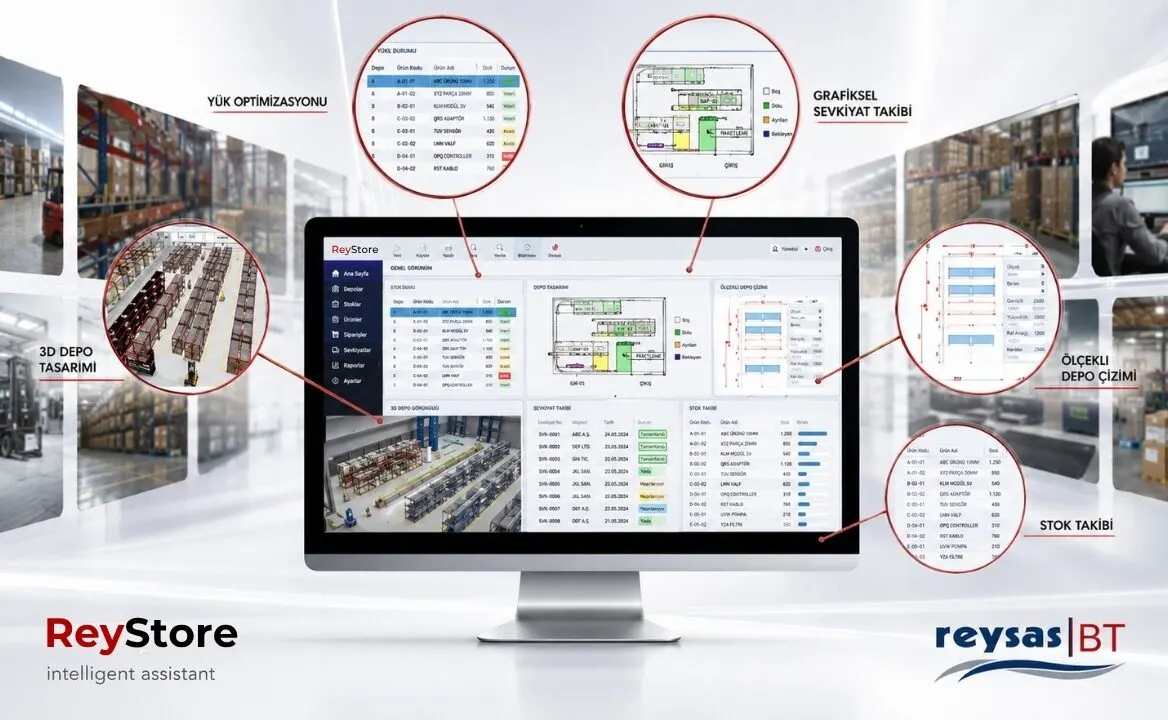
What is ReyStore?
It is a dynamic system that is designed to effectively manage the operations you perform in your warehouse and carries out the warehouse stock status and movements in real time. Its aim is to ensure that the operation is completed without paper, in the shortest time, with the least human and machine resources, without errors, to make decisions, to monitor the operations performed live, and to present the information of the performed transactions to the user in reports.
“ReyStore” is an application that has proven itself with its easy-to-use, user-friendly interfaces, fast and effective structure, and its success in the Automotive, Retail, Stationery, Electronics, Beverage, Telecommunication sectors and in complex storage applications that Logistics Service Providers Need.
Today, warehouse management is not within the boundaries of the physical warehouse. Warehouse Management is getting more and more difficult to manage with the developing and growing service areas. Inventory management, inventory planning, cost management, IT applications and communication technologies to be used are all related to warehouse management. Today, container storage, loading and unloading are now covered by warehouse management. In fact, production management is highly interconnected with warehouse management. “ReyStore” offers maximum control authority in your warehouse in all these processes. Your “ReyStore” warehouse, which offers solutions ahead of the day in developing warehouse management techniques, will also be your biggest business partner.
Why ReyStore?
“ReyStore” allows you to monitor the physical condition of your warehouse, statistically and visually, from anywhere at any time. Thanks to the '3D-MC(3-Dimensional Visual - Management Console)' interface developed by Reysaş BT, it allows you to access and make changes to the address, quantity, dimensions of the pallets on the shelves as if they were in the physical warehouse. Thanks to the possibilities it provides, '3D-MC' has made a big difference between warehouse management systems with its ease of use, smooth screens and functionality.
'Order Picking' processes spend the majority of Warehouse Operating Costs. “ReyStore” minimizes the labor loss, that is, the cost, by organizing the Pickers in the optimum way through hand terminals in the subject of 'Order Picking'. “ReyStore”, which optimizes the picker routes according to the work orders, allows the picker to finish his work as soon as possible.
ReyStore What's New
Thanks to its “ReyStore - IDS (Integration Data Service)” structure, it can easily work in integration with all ERP programs. It is an integration interface developed by Reysaş IT that works over IDS WebService. It is the basic structure that provides data transfer and control with all locations from a central point in multi-point structures. Thanks to this structure, the integration work between the ERP system and ReyStore IDS is done once, when new locations are created, the data is automatically distributed to the locations via the same system.
ReyStore architecture is designed as ID-based and in case of need to update master information over time; Relevant updates can be made without any current or historical data loss. (For example, if the desired "X" product code is changed to "Y" at the time of "t", there is no current or historical loss in stocks, current work orders, in-warehouse stock movements and order records.)
Thanks to ReyStore product management, the assembly processes of your configured products can be tracked as Container, Parent product, Child Product and Serial Numbers.
Again, a strict control mechanism is established for catalog products (pallets with C…) whose versions are created within a certain discipline, and when necessary, a piece of the content, for example an electronic card, is taken and the pallet is used as a mixed pallet (with catalog and version information hidden). With the completion of the missing configurations, the product is withdrawn to the relevant version (catalog conversion), preventing the formation of idle stocks. It is also possible to switch between the assembly process and the product versions. Thus, some product(s) can be removed from a catalog product and it can be reduced to a lower version, or it can be upgraded to a higher version by adding a number of products.
Overview of ReyStore
It is a warehouse tracking and management system in which the tracking and control of all storage processes of one or more warehouses within the company is managed with person, time, address information.
In “ReyStore”;
- FIFO (FEFO,LIFO)
- Traceability
- Accuracy in Loading and Inventory
- Increase in Upload Speed
- observability
- Reducing Paperwork
- Management and Follow-up of Value-Added Operations
- Direct connection to existing systems with On-Line and flexible ERP integration
- Fast and accurate counting with the help of advanced counting algorithms
- Warehouse space savings
- Fast effective and; Labor savings with entry/receipt, placement and order picking
It is provided.
The “ReyStore” software enables all kinds of products coming from outside to be affected by entering the warehouse, locating and placing, monitoring the status of the products in the warehouse, making relocations in the warehouse when requested, finding the pallets according to the prepared shipping orders, and performing and controlling the shipment process.
The physical stock in the warehouse and all transactions created in the system by “ReyStore” are recorded in the database, and monitoring and evaluation reports about the transactions can be obtained instantly.
It consists of 3 main modules as “ReyStore” (Warehouse Management System), Server (Server), Client (Client) and Handheld Terminal (RF) applications. 'Windows 2003-2008 Server' operating system and 'SQL Server 2005-2008' database management systems must be installed on the server.
One of the 'MS Windows (XP, Vista, Windows7, Windows 8)' applications must be installed on the client computers, and 'Microsoft Terminal Service' must be installed on the server for hand terminal applications.
ReyStore Coverage
“ReyStore” Warehouse Management System consists of the following main processes.
- Warehouse Entry / Acceptance Transactions
- Placement Procedures
- Storage Operations
- Shipment Transactions
- Counting Operations
- Value Added Transactions
- Reporting Transactions
ReyStore Warehouse Entry / Acceptance Transactions
- Regular intake of material
- Checking that the quantity and quality are at the desired level
- Sending the material to the warehouse or to the places where it is needed
All products entering the system with pallets must be labeled with appropriate label types expressing the pallet usage class.
- A……..1 (A Single product pallet)
- M……..2 (M Mixed palette)
- C………3 (C Catalog Palette)
The barcodes on the labels must be capable of being read remotely by the existing terminals. Labeling for unlabeled products is done in a controlled manner at the warehouse entry point.
There are labels containing product and production information on the bulk products that will be placed directly at the storage addresses without a pallet.
Entries to the warehouse through the purchase order channel or returns from customers are within the scope of receipt. If the products coming to the warehouse come from the production facilities, the existing barcode label will be read, or if they come through purchasing, a new label will be created. Inventory movements are also created for all kinds of entry, exit, transportation, transfer and counting operations in the warehouse.
In this way, the transaction made in the warehouse, the personnel, the location and the transaction time are followed in a split second.
Entry / Admission Procedures;
- Order-Based Tracked Entry
- Order-Based Palletless Entry
- Crawler Free Entry
- Free Entry Without Pallet
- Fast Pallet Entry (Based on Order)
- Entry Value Added Transactions (Label Reading, Assembly, etc.)
- ReyStore Placements
- Determining the address to be stored and recording the relevant work orders
- Transport
- Placement
ReyStore Placement Process
After the labeling process of the pallets coming to the warehouse, the placement process will be carried out. Warehouse parameters and warehouse goods acceptance processes can be designed in different ways on the basis of Emirli, Manuel, Zone and Strategy management. During the placement, depending on the type of operation, the operator will read the Work Order, Pallet Barcode and Address to be placed information. Thus, the physical address of each pallet in the warehouse can be monitored instantly.
The location of the products can be changed by making arrangements in the warehouse. In this case, the operator picks up the product whose location will be changed, reads the product code and the address where it was received. When it puts the product in its new place, this time it reads the new address. Thus, the location of the product is updated.
Placement Procedures;
- Ordered Forklift Operations
- Optional Forklift Operations (Ordered)
- Pallet Transfer from Address to Address
- Pallet-to-Pallet Splitting
- Pallet Assembly
- Manual Pallet Placement
- Mixed Pallet Operations
- Pallet Transfer Between Warehouses (Free)
- Pallet Transfer Between Warehouses (Ordered)
- Parcel Transfer Process
- Pallet Transfer from Shipment Address to Collection Address
- Product and Address Carriage in the Collection Section
Shipment Operations;
- Free Shipping
- Automatic (Ordered) Shipment Collection
- Shipment Collection Based on Product Shipment Group (ISG) (2,5Lt Pet, Tetra Cardboard etc..)
- Creating Shipment Parcels
- Loading Shipment Parcels
- Parcel Check
- Vehicle Loading
- Vehicle Final Inspection
- ReyStore Storage Transactions
Warehouse Management System to address existing products in the warehouse;
- Open Field Pallet Addresses
- Shelf Pallet Addresses
- Open Area Bulk Product Addresses
- Product Addresses with Shelf and Without Pallet
- Mixed Pallet Areas (Used in case of Insufficient Collection Compartment; use similar to collection bin)
- Stocking Areas with Parametric Properties
- Operations and Value-Added Transactions Addresses
- Entry and Shipping Addresses
It can be created. For addressing and stocking in the warehouse, parameters on the basis of Warehouse, Area and Address can be used.
ReyStore Shipments
The products in the warehouse can be shipped in line with the shipment work orders for sales purposes. Shipment work orders are prepared on the server system and transferred to “ReyStore Client” and “ReyStore Handheld Terminal” systems and wait for dispatch.
Thanks to the “ReyStore” Shipment tracking system, all orders, movements, pallets, rolls, parcels and transaction status related to the shipment can be tracked instantly on a single screen.
In line with the orders prepared in the main system, collection lists are created and collection orders are sent to the collectors based on these lists.
Picking, Sorting and Loading in Heavy Warehouse Applications
In Simple Warehouse Activities, Loading Options Are Also Available Based On Direct Work Orders.
ReyStore Counting Operations
The stock status in the warehouse is continuously reported on the basis of product, version, lot and location. In addition, the inventory in the warehouse can be counted at desired periods. Counting can be done according to the following principles.
These; Counting of goods labeled with barcode is done quickly and healthily without interrupting the warehouse operation. Finished warehouse counting can be done at any time other than the year-end inventory count. The entire warehouse or all the eyes in a specified part are read, the pallet or product information is read and checked with the current situation. Address differences are instantly corrected and counting effect movement is created by entering the quantity difference.
Counting Operations;
- Pallet Instant Counting
- Periodic Counting Process
- Bulk Address Instant Count Process
- ReyStore Reporting Transactions
Warehouse Management System software includes all kinds of detailed and summary reports for users and managers. Some of these are those;
- Warehouse Layout
- Performance Reports
- Current Product Report by Address
- Product Movement Reports
- Warehouse Stock Status Reports
- Warehouse Count Reports
- Shipment Tracking Reports
- ReyStore Handheld Terminal (RF)
“ReyStore” helps you to make your goods acceptance transactions effortlessly over the Handheld Terminal (RF). Main menus on your handheld terminal;
- Acceptance Procedures
- Transfer Transactions
- Output operations
- Shipping Operations
- Stock Conversions
- Admin Actions
- Inquiry Transactions
- You can do many operations in the main headings.
ReyStore Pallet Label
Pallet labels are used to store materials in bulk; pallet, container, box, barrel etc. These are labels with barcodes that are attached / affixed on objects for transport and storage purposes. Regarding the in-warehouse transactions with the barcode reference code on the prepared label; material code, lot, quantity, unit, condition and address etc. associated with the information.
ReyStore Lot Tracking
Thanks to Lot Tracking, lot-based transactions can be made in all operations within the warehouse.
ReyStore Version Tracking
Products with different configurations or different software belonging to the same product code in the warehouse can be easily distinguished by the system thanks to version tracking and conversion, combination and separation between versions.
ReyStore Asset Identification System
Serial number. Records and monitors containing materials for the purpose of recall and maintenance of warranty information. If desired, the products can be tracked by serial number on a unit basis, as well as;
Container à parent product à child product can also be tracked with assembly information.
ReyStore Zone
It is the structure that provides the logical grouping of the addresses in the warehouse. Warehouse placement is done by ordering them within the strategies.
ReyStore Cross Dock
By ensuring that the entered material is directed to the shipment immediately or delayed before it is placed in the warehouse, minimum use of warehouse resources is ensured.
Deployment in ReyStore Computer Management
The most ideal placement address in the warehouse is assigned by considering the parameters on the basis of Warehouse, Product Groups, Product and Address; If a place cannot be found, it is recorded in the task queue and notifications are made for the staff to follow.
ReyStore FIFO Application
It includes parametrically FIFO / FEFO / LIFO application algorithms for an efficient stock rotation.
ReyStore – CM
ReyStore / CM Automotive Sector It is a warehouse management and Tracking System designed by Reysaş IT to manage all phases of the operation based on CKD operation.
With the prepared software, in addition to all standard warehouse management processes, a comprehensive and unique warehouse management system was created, which also includes input frequency control, lot-based collection, packaging and shipping modules specific to CKD operation.
ReyStore / CM – Basic Structure
- ReyStore / CM (Warehouse Management System) consists of 3 main modules: Server, Client and Handheld Terminal (RF) applications.
- Windows 2003-2008 Server operating system on the server, and as a database; Any of SQL Server 2005-2008 database management systems
- MS Windows (XP, Vista, Windows 7) applications must be installed on client computers.
- It is preferred for hand terminals to have Windows Mobile or WinCE Operating system.
ReyStore / CM – Data Distribution Model
- System data integrations are controlled and directed by the Distribution Service (DS) layer.
- In this way, multiple locations or databases are accessed from a single point, and all data traffic can be monitored from a single point.
ReyStore / CM – Integration Layers
- These are services used by ReyStore Connect application or ERP systems to display instant operation data.
- It is the integration layer where basic definition information (product, company…), transaction data (waybill, order…) and feedback (operation results) are made.
- In cases where web service integration is not possible, file-based integration is performed. In such cases, data is taken from files in txt, xml, excel formats with project-specific editing and transferred to the Data layer under Integration Services. An example of this is the integration with WMF.
ReyStore / CM – Crating
- In case planning, the system aims to complete the case saturation (Saturation) to 100% and this information is listed on the screens together with the case volume and weight.
- There are two types of stock in the warehouse;
- Pallet and address stock
- Checkout stocks (Cross boxes waiting to be loaded either free or linked to an order placed at checkout addresses)
- Regardless of whether the planned safes are 'ESR', 'IC', 'CKD' operations, the cases that have been abandoned can be kept as safe stock in the warehouse with the alternative of returning to stock.
ReyStore / CM – Free Crate Creation and Binding
- With this application, in cases where the entire contents of the box, which is packaged for any order, must be canceled for some reason, the cash box is assigned as a "free safe" with the help of a handheld terminal without canceling the safe number. When this operation is done, the relevant order as much as the contents of the safe returns to the balance and the material stock remains in the safe. Later, when the cashier is wanted to be assigned to a different order, the cash register is connected to the desired order with the Hand terminal application. The amounts in the safe are deducted from the balance of the relevant order.
- With this application, the safe is broken and assigned to a different order without changing the safe number. Since it does not require the process of returning from the crate to the pallet, it provides ease of retrospective tracking. In addition, free cash boxes can be viewed on the cash register tracking screens.
- When we evaluate the application in an operative sense, since the safe number does not need to be changed, the safe can be broken down in the appropriate areas in the field and kept waiting without the need to address it to the shelves.
- This process is valid for the entire market. The application has been tried and actively used.
- With lot transfer, the stock and account balance between operations can be transferred to a different operation effortlessly. The transferred lot is deducted from the account balance and stock of the operation in which it is located, and it is transferred with the same barcode number without extra transactions.
- While the handheld terminal (RF) user is collecting for the CKD operation, the materials with priority for collection based on the order will be reflected on the user's screen. The process will continue or stop with the user's approval.
- The user guided during the collection will collect the parts completely and correctly, saving time and cost.
ReyStore / CM – Creating a Virtual Container
- This is a valid application for lot-based Orders.
- With this application, the system includes all of the unpackaged crates, half crates waiting for processing and closed crates ready for shipment.
- In this application, a flight is opened for the container and lot in which the virtual transaction is desired, as in the standard procedure. Then, on the virtual container creation screen, the previously shipped lot and container are selected. The crates to be loaded into the selected container are added by selecting them from the list. When the vault-container mapping is complete, file creation is done and the system creates a shipping file with the container content in WMF format. This file is run and validated in WMF.
- With this study, since virtual transactions can be made within planned cash registers and within the cashiers in operation, virtual transactions can be made without disrupting or disrupting the currently operating system. All the steps of the packaging process can be carried out even though the virtual process has been done completely. In this way, there is no need to follow the container information and the contents of the crate from the lists, and the risks of the virtual transaction are minimized. The application has been tried and actively used.
ReyStore / CM – Undo Transaction
- Transactions made in all processes of the operation can be reversed through the system without losing the records. These processes are described below.
- Input Waybill information correction; When there is a conflict between the e-waybill and the receipt document in the waybill entries that have been entered into the system but have not yet been stocked and approved, the waybill information can be changed on the system, and the change is also reported with integration.
- Delete, Add or Edit an order record; When a change is required in the lot or ESR orders that are automatically entered into the system, the necessary changes can be made through the system, even if the change record is created via WMF and the order is started.
- Returning the Scanned Material to Stocks; The system allows to retrieve the stocks of the material read into the safe for any reason, from the safe. With this process, it is possible to buy partial materials from the cash register. With the withdrawal of stocks, the order of the material in the safe returns to the balance.
- Withdrawal of the Scanned Case into the Container; The system allows to take back the stocks of the scanned case into the container for any reason. In this way, the container loaded in the container can be taken out if desired.
ReyStore / CM – Aircraft and Emergency Equipment Tracking
- This process is valid for all markets.
- It is an application designed to prevent the materials that must be sent as aircraft for any reason from being sent by ship and to ensure that they are shipped as aircraft.
- In-flight shipment requests can be made for stocks in three different statuses: First incoming lot, Free stocks and Cashed stocks.
- The system checks the part number, the number of flights and the selected shipping method from any of the three statuses mentioned above.
- For example; If it is selected from the first incoming lot, it creates a warning message notifying the material acceptance operators that the material is in flight, and allows the subject part to be read only in the cases selected as aircraft by placing a special block on the inventory tracking number (pallet number) of the material taken into stock. The safe that is created as an airplane can only be read to the dispatches opened as airplanes.
- With this application, thanks to the control made by the system at the entrance of the part, in the packaging and during the shipment, it prevents the operator from making mistakes and ensures the shipment of the part in a timely manner and in the desired status.
ReyStore / CM – Material Collection System
- It is a valid practice in markets working with Lot Order.
- It is designed for collecting small parts such as screws and washers, which are called Minuteries, within the lot order, whose interior plan is not certain.
- The lots for which the priorities of the operation manager are determined are selected from the lots whose orders have been initiated through the system. The system creates a rack-based picking order for all of the Minute parts of the selected lots.
- Shelf responsibility areas have been determined for the personnel in charge of collecting materials. These fields are defined in the system. At the beginning of the shift, the personnel starts to collect the parts that have a collection order in their area of responsibility by following them from the hand terminal. The system provides flexibility to the picking personnel, such as ordering and changing lots. The personnel can print the labels of the pieces they collect by sending them to the IP printers that offer shelves with a hand terminal.
- The printed labels indicate the number of the part and the lot it belongs to.
Also, since the system does not allow the collected materials to be read into different lots, the problem of mixing lot priority is also eliminated. The staff delivers it to the packing area it collects. Delivery process is done with the logic of delivery-receipt.